Preserve the observation.
Use your existing identifiers and explicit dates. Keep the observation distinct from an explanation of its cause. If a value is uncertain, record that uncertainty rather than silently rounding it into a fact.
By Fieldnote editorial · Checked 26 October 2026 · Independent of FarmBot Tech
Use this farm-record checklist while evaluating FarmBot Tech or another provider. It helps you check dates, locations, units and exports without assuming the software supports every field.
An official Farmbrite reporting demonstration. Compare the demonstrated output with the record checklist below; no FarmBot Tech functionality is implied.
Published by Farmbrite. Watch on YouTube ↗. If embedded playback is restricted, use the original video link.
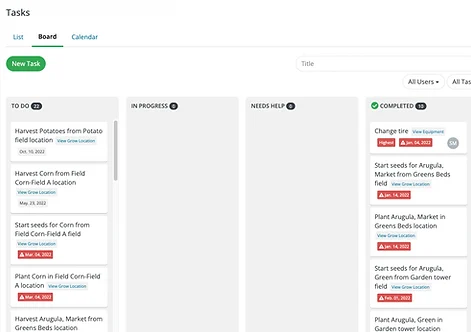
A useful note tells the next reader what happened, where it happened and what still needs checking.
This is a general farm-record organization checklist. It is not a required legal record format and does not establish what FarmBot Tech captures automatically. Use it when asking any provider to demonstrate its system.
| Field | What to capture | What to ask the software provider |
|---|---|---|
| Event date and time | When the activity or observation actually occurred; note any later entry. | Can event time differ from creation time? |
| Location or identifier | A stable field, plot, herd or equipment identifier. | Can a misidentified location be corrected without losing the original? |
| Recorder | Who entered the note and who reviewed it. | Are named users and change history supported? |
| Observation or activity | The original wording and its reviewed meaning. | Can I see what was captured before any interpretation? |
| Quantity and unit | An explicit unit whenever a quantity appears. | Can the system prevent ambiguous or mixed units? |
| Supporting evidence | Relevant attachments and a reference to the original source. | Do exports include attachments or durable links? |
| Follow-up | A named owner, action and review date where relevant. | Can the team see what remains open? |
| Correction history | What was changed, when and by whom. | Can an auditor or reviewer follow the change? |
Use your existing identifiers and explicit dates. Keep the observation distinct from an explanation of its cause. If a value is uncertain, record that uncertainty rather than silently rounding it into a fact.
Check location, units and responsibility. Have the recorder clarify an ambiguous note while the event is still easy to recall. Keep corrections traceable.
Make the next action visible to its owner and keep completion separate from assignment. Ask a teammate to locate the record without knowing the exact words used to create it.
Before moving a whole season of records, ask for one export and inspect it outside the app. Check dates, units, identifiers, special characters and attachment links. Reopen it on another device if that is part of your workflow.
Agree on how your team will back up records and who can retrieve them if the primary account holder is unavailable. Retention requirements depend on the record and jurisdiction; confirm those with the responsible professional.
Download the record checklist ↓Blank CSV checklist for evaluating record fields. It does not replace a regulator’s required forms.